
The Folding iPhone Just Got a Whole Lot Easier to Imagine
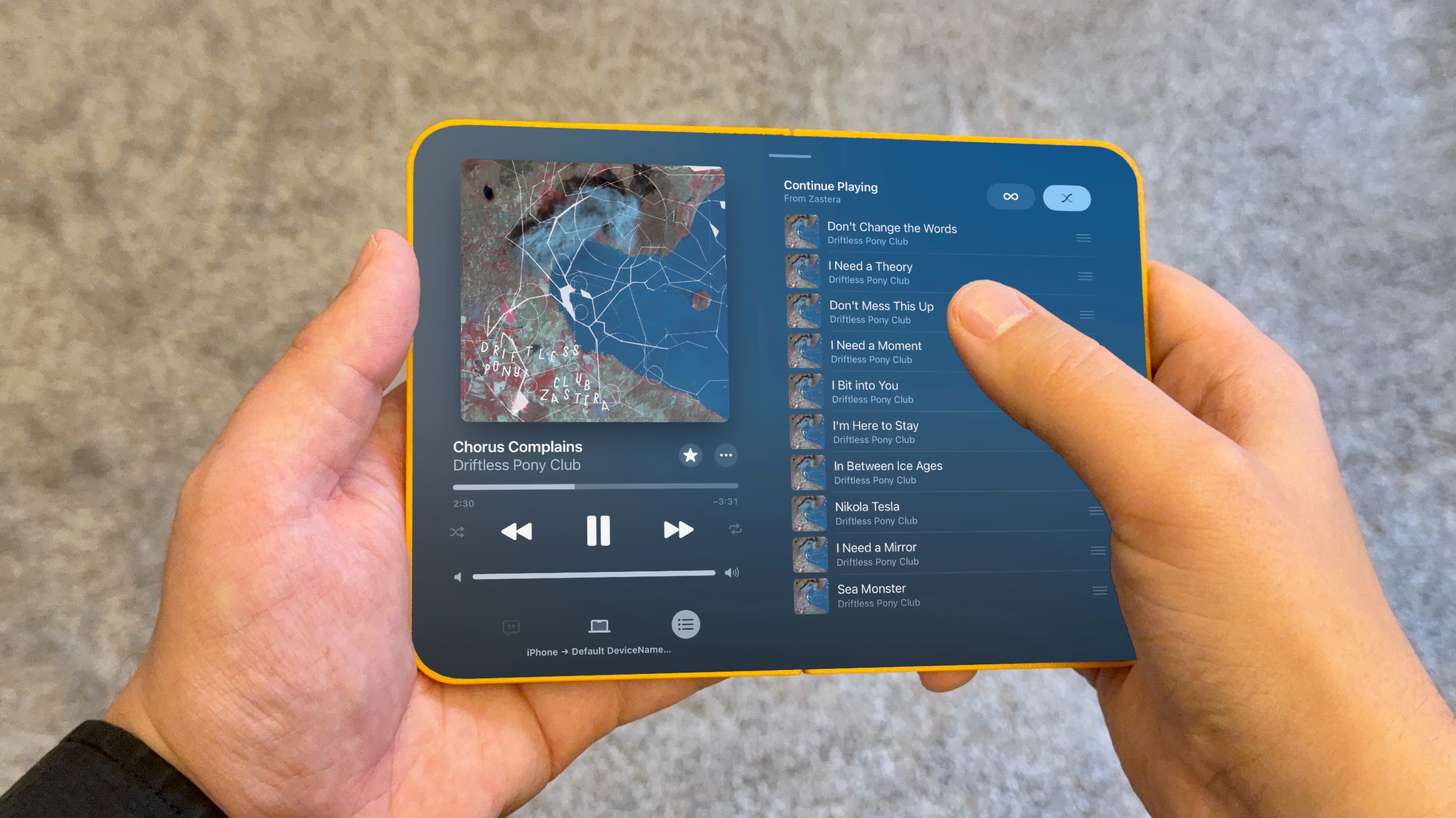
Apple's long-rumored folding iPhone has been the subject of intense speculation for years, but getting a real sense of what the experience will actually feel like has been nearly impossible — until now. Thanks to a subtle but significant capability introduced in iOS 27, users can resize iPhone Mirroring to almost any arbitrary dimension on their Mac. That means you can stretch the display to match the expected screen proportions of Apple's upcoming foldable device, giving you what is arguably the most authentic software preview of the folding iPhone that exists today.
It sounds simple, even accidental, but the implications are surprisingly rich. This is not just a curious trick for tech enthusiasts. It is a genuine window into how iOS apps will behave on a device that unfolds to reveal a much larger canvas than any iPhone currently offers.
What Is iPhone Mirroring and Why Does Resizing Matter?
iPhone Mirroring, introduced in iOS 18 and macOS Sequoia, allows users to interact with their iPhone directly from their Mac screen. You can launch apps, scroll through content, and use your keyboard and trackpad to control your phone — all without picking it up. It was already one of the more seamless continuity features Apple had shipped in years.
With iOS 27, Apple has quietly expanded that functionality by making the iPhone Mirroring window freely resizable. Previously, the window maintained a fixed aspect ratio tightly tied to the iPhone's physical screen dimensions. Now, users can drag the window to any size they like, and the apps running inside it scale and adapt accordingly.
This is where things get interesting for anyone tracking Apple's foldable phone ambitions. The folding iPhone is widely expected to feature an inner display that unfolds to a significantly wider and taller form factor than a standard iPhone. By stretching the iPhone Mirroring window to those anticipated dimensions, users and developers alike can observe how iOS and its apps handle that dramatic change in screen real estate.
What the Folding iPhone's Screen Dimensions Are Expected to Look Like
Based on supply chain reports and analyst projections accumulated over the past couple of years, Apple's folding iPhone is expected to feature an outer cover display similar in size to a standard iPhone and an inner unfolded display in the range of 7.8 to 8 inches diagonally. That puts the unfolded screen closer in territory to an iPad mini than to any current iPhone model.
When you resize iPhone Mirroring to approximate those dimensions — wider, taller, with a more tablet-like aspect ratio — some apps adapt gracefully while others reveal the seams in their design. Apps built with modern SwiftUI layouts and flexible Auto Layout constraints tend to scale cleanly, expanding their content area and repositioning interface elements intelligently. Legacy apps or those with rigid fixed layouts, on the other hand, can look awkward, overstretched, or padded with large empty margins.
This divide is exactly what Apple's developer ecosystem needs to grapple with ahead of the folding iPhone's arrival, which many analysts now peg for sometime in 2026.
What This Reveals About iOS 27 and Apple's Foldable Strategy
The fact that Apple has made iPhone Mirroring freely resizable in iOS 27 is almost certainly not a coincidence. Apple rarely ships features without strategic intent, and giving developers — and curious users — a way to test arbitrary iPhone screen sizes is a low-friction, high-value move in the lead-up to a foldable product launch.
Think of it as a quiet onboarding process for the entire app ecosystem. Developers who experiment with resizing their apps in iPhone Mirroring today will quickly discover whether their layouts hold up under the conditions a folding iPhone will impose. It is, in effect, a free compatibility testing tool that Apple has embedded directly into the operating system without needing to ship a single hardware unit.
This approach mirrors — no pun intended — what Apple did with iPad multitasking and Split View in the years before those features matured. By gradually introducing layout flexibility requirements through software updates, Apple nudges the developer community toward building more adaptive interfaces before the hardware that demands them even exists in consumers' hands.
How to Try It Yourself Right Now
If you are running iOS 27 on your iPhone and macOS on a compatible Mac, you can get a taste of the folding iPhone experience with just a few steps. Open iPhone Mirroring from your Mac's dock or applications folder, wait for your iPhone's screen to appear in the window, then grab any corner of the window and drag it freely. You are no longer constrained to the default phone-shaped proportions.
Try stretching the window to a wide, landscape-friendly rectangle, or pull it into a taller, more square-ish format that approximates an unfolded inner display. Launch a few of your most-used apps and pay attention to how they respond. Does your email client show a sidebar? Does your news app reorganize into a two-column grid? Does your favorite game simply blow up its assets to fill the space, or does it add detail and context?
The variation in behavior across different apps is genuinely illuminating and gives you a meaningful preview of what daily life with a folding iPhone might feel like.
What Developers and Users Should Take Away From This
For developers, the message is clear: now is the time to audit your app's layout behavior. If your interface breaks or looks unpolished when the window is resized in iPhone Mirroring, it will likely exhibit the same problems on a folding iPhone. Investing in adaptive layout work today is not just good practice — it is preparation for a product that could reach tens of millions of users within the next year or two.
For regular users, this is an exciting preview of how iOS is evolving to support hardware that has not officially launched yet. Apple's software ecosystem is quietly laying the groundwork for a major form factor shift, and resizable iPhone Mirroring is one of the clearest signals yet that the folding iPhone is not a distant dream but an imminent reality.
The folding iPhone era may be closer than many people think — and thanks to iOS 27, you can start exploring what it will feel like today, no new hardware required.