
Why You Should Use Your iPhone to Track Medications
Forgetting to take a medication is more common than most people realize. Whether you manage a single daily supplement or a complex schedule of prescription drugs, keeping track of every dose at the right time can be genuinely challenging. The good news is that the iPhone you already carry in your pocket is more than capable of helping you stay on top of your regimen — and it does so with surprising depth and ease.
Apple built a powerful medication tracking feature directly into the Health app starting with iOS 16. This means no third-party apps, no subscriptions, and no extra hardware required. If you own an iPhone running iOS 16 or later, you have a fully functional medication tracker available right now. Here's everything you need to know to set it up and get the most out of it.
What Is the Apple Health Medications Feature?
The Medications feature inside the Apple Health app allows you to log every medication, vitamin, or supplement you take on a regular basis. You can record the name of the medication, the dosage, the form it comes in (tablet, capsule, liquid, topical, and more), and the schedule on which you take it. The app then sends you reminders at the times you specify, logs your history, and even flags potential drug interactions — a feature that can be genuinely life-saving for people managing multiple prescriptions.
All of this data is stored securely on your device and synced through iCloud with end-to-end encryption, meaning only you (and people you choose to share with) can access it. Apple does not use your medication data for advertising or share it with third parties.
How to Add a Medication to the Apple Health App
Getting started is straightforward. Follow these steps to add your first medication:
- Open the Health app on your iPhone (the white icon with a red heart).
- Tap the Browse tab at the bottom of the screen.
- Scroll down and tap Medications.
- Tap Add a Medication to begin the setup process.
- Type the name of your medication into the search field. The app will suggest matching medications from a built-in database, making it easier to find the correct spelling and identify the drug.
- Select your medication from the list and choose the appropriate form — tablet, capsule, patch, liquid, spray, or others.
- Enter the dosage strength (for example, 10 mg or 500 mg).
- Set your schedule by choosing the days of the week and the specific times you take this medication.
- Optionally, add notes or additional details to help you remember specific instructions.
- Tap Done to save the medication to your list.
Repeat this process for each medication, vitamin, or supplement in your routine. The app keeps everything organized in a single, easy-to-read list.
How to Log a Dose and Stay on Track
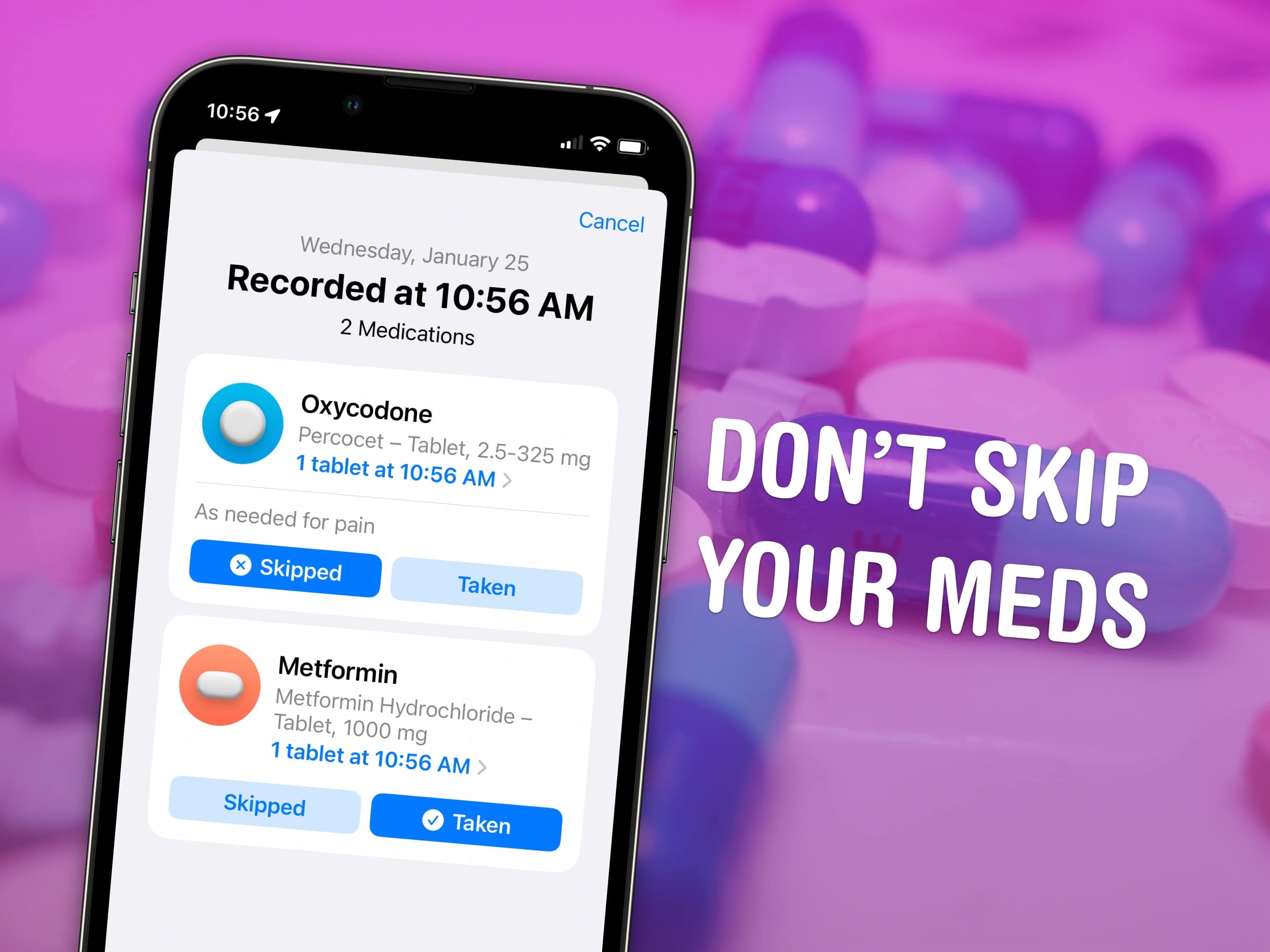
Once your medications are set up, the Health app will send you a notification at the scheduled time. When you receive the reminder, you can log whether you took, skipped, or want to be reminded again later. This creates a running log of your adherence, which can be useful to review before a doctor's appointment or when assessing whether a treatment is working.
To manually log a dose at any time, open the Health app, navigate to the Medications section, find the medication in your list, and tap to mark it as taken or skipped. The app displays a clear calendar view so you can see your history at a glance and identify any patterns in missed doses.
Drug Interaction Warnings: A Standout Safety Feature
One of the most impressive aspects of iPhone medication tracking is its built-in drug interaction checker. When you add multiple medications to the Health app, it automatically checks for known interactions and alerts you if any combinations could be potentially harmful. These warnings are sourced from established pharmaceutical databases and are displayed clearly within the Medications section.
This is not a replacement for professional medical advice, but it does serve as an important safety net — especially for patients who see multiple specialists who may not always coordinate with each other. If the app flags a potential interaction, it is a strong signal to speak with your doctor or pharmacist before continuing.
Sharing Your Medication List with a Doctor or Caregiver
Apple Health also makes it simple to share your medication information with healthcare providers or trusted family members. Through the Health app's sharing feature, you can grant access to selected data, including your medication list and log history. This can improve the quality of conversations with your doctor and eliminate the common problem of trying to recall every prescription from memory during a rushed appointment.
To share, go to the Sharing tab in the Health app, tap Share with Someone, and follow the prompts to invite a contact. Recipients can view your shared data through their own Health app, making it convenient for caregivers supporting elderly parents or patients managing chronic conditions.
Tips for Getting the Most Out of iPhone Medication Tracking
- Use Apple Watch reminders — If you wear an Apple Watch paired to your iPhone, medication reminders will also appear on your wrist, making them even harder to miss.
- Enable Critical Alerts — For essential medications, consider enabling Critical Alerts in your notification settings so the reminder sounds even when your iPhone is on Do Not Disturb mode.
- Review your log weekly — Take a few minutes each week to review your adherence history. Spotting patterns early helps you adjust your routine before missed doses become a real problem.
- Keep your medication list current — Update the app whenever a prescription changes, a medication is discontinued, or you start something new. An outdated list is less useful and could give false comfort when checking for interactions.
- Add over-the-counter supplements — Don't limit the feature to prescriptions. Vitamins, herbal supplements, and OTC medications can all interact with prescriptions, so including them in your Health app gives you a more complete picture.
Take Control of Your Health with the Tools Already in Your Hand
The medication tracking feature in Apple Health is one of those capabilities that is easy to overlook but can make a meaningful difference in daily life and long-term health outcomes. Research consistently shows that medication non-adherence contributes to hospital readmissions, treatment failures, and preventable complications. Having a reliable, always-available reminder and logging system removes much of the friction that leads to missed doses.
Whether you're managing a temporary course of antibiotics or a lifelong maintenance medication, taking five minutes to set up the Medications feature in Apple Health is time well spent. Your iPhone is already with you everywhere — it might as well be working to keep you healthier too.