
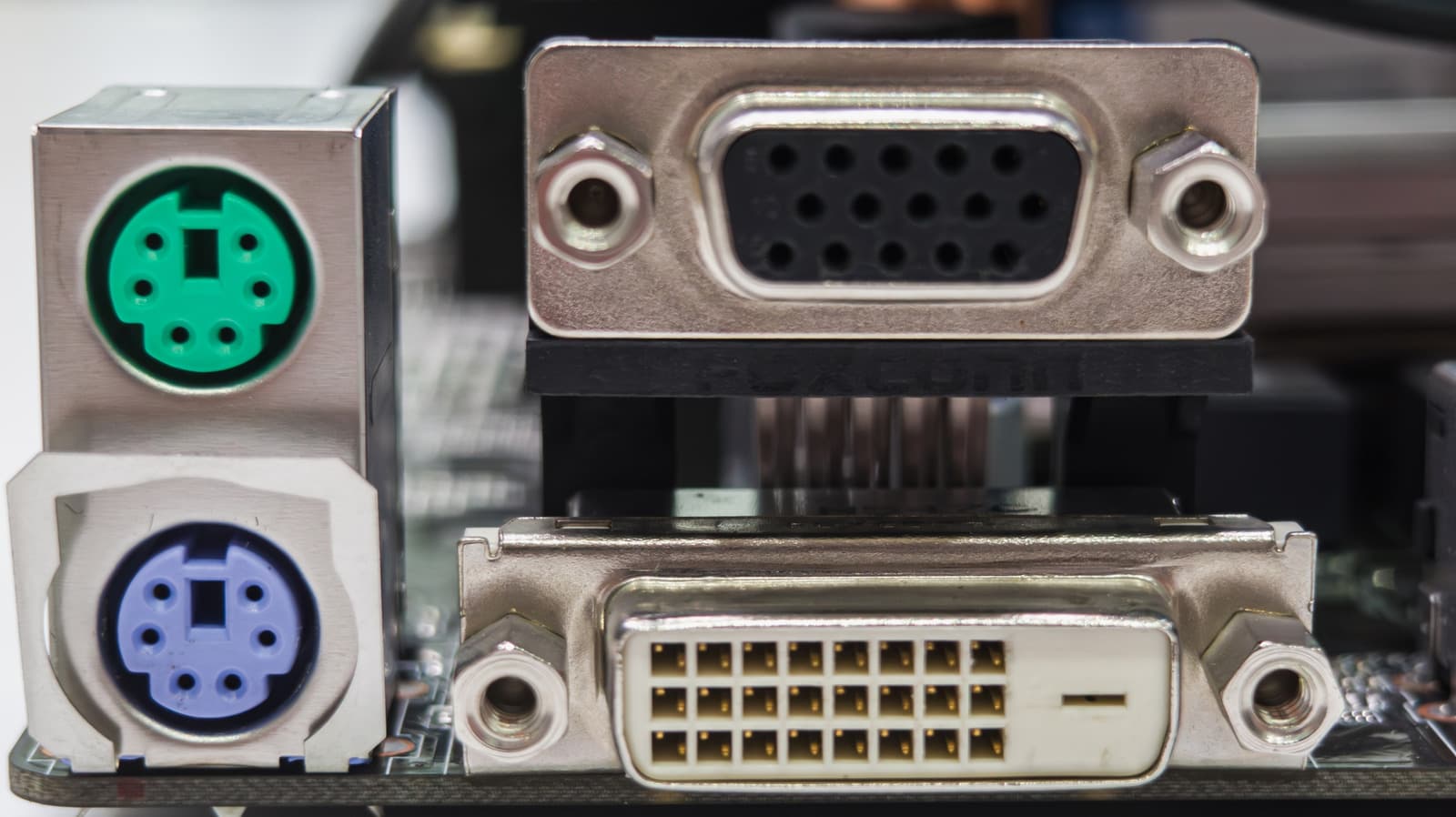
DVI vs. VGA: Understanding Two of Computing's Most Iconic Video Ports
If you've ever rummaged through a box of old cables or picked up a secondhand monitor, you've almost certainly encountered either a VGA or DVI connector. These two interfaces dominated the desktop computing landscape for decades, serving as the default bridges between computers and displays for millions of users worldwide. While newer standards like HDMI, DisplayPort, and USB-C have largely taken over, VGA and DVI still appear in workplaces, classrooms, and home offices everywhere. Understanding the difference between them is more useful than you might think.
What Is VGA?
VGA stands for Video Graphics Array. It was introduced by IBM in 1987 alongside the PS/2 computer line and quickly became the universal standard for PC display output. The VGA connector is immediately recognizable: a trapezoidal 15-pin plug arranged in three rows, typically colored blue on modern hardware. For much of the 1990s and early 2000s, it was the only connection type you'd find on a consumer monitor.
The most important thing to understand about VGA is that it is an analog signal standard. That means it transmits video data as a continuous electrical wave rather than as discrete digital values. While analog transmission was perfectly adequate for the cathode ray tube (CRT) monitors of its era, it introduces a fundamental limitation: signal degradation. The longer the cable, or the more times the signal is converted, the more quality can be lost. You may notice this as a slightly blurry or "soft" image, especially at higher resolutions.
VGA supports resolutions up to 2048x1536 in theory, but in practical use on real hardware, image quality becomes noticeably poor at anything above 1080p. For standard definition and even HD content on older screens, though, it did the job reliably for many years.
What Is DVI?
DVI stands for Digital Visual Interface. It was developed by the Digital Display Working Group (DDWG) and released in 1999 as a forward-looking replacement for VGA. The goal was straightforward: bring digital display connectivity to the mainstream consumer market as flat-panel LCD monitors began replacing bulky CRTs.
Unlike VGA, DVI is capable of carrying a digital signal, which means it can deliver a pixel-perfect image without the signal degradation that plagues analog connections. When a digital source communicates with a digital display over DVI, what you see on screen is a precise, lossless reproduction of the intended image. This is a meaningful real-world advantage, particularly at higher resolutions or on sharp LCD panels where softness would be noticeable.
DVI connectors are larger than VGA plugs and come in several variations, which is one reason the standard can feel confusing at first glance.
The Different Types of DVI Connectors
- DVI-A (Analog Only): Carries only an analog signal, making it functionally similar to VGA. Rarely encountered in practice.
- DVI-D (Digital Only): Carries only a digital signal and is the most common type found on modern DVI-equipped hardware. Available in single-link and dual-link versions.
- DVI-I (Integrated): Can carry both analog and digital signals through the same connector, offering the most versatility. Also available in single-link and dual-link formats.
The dual-link variants of DVI-D and DVI-I use additional pins to double the bandwidth available, supporting resolutions up to 2560x1600 at 60Hz. Single-link DVI tops out at 1920x1200, which covers the needs of most standard HD monitors.
Key Differences Between DVI and VGA
At the core, the most significant difference between these two standards comes down to signal type. VGA is purely analog, while DVI (in its most common DVI-D form) is digital. This distinction has direct consequences for image quality, especially on modern flat-panel displays that are themselves digital by nature. When a digital monitor receives a VGA signal, it must perform an analog-to-digital conversion internally, which can introduce subtle imperfections. With DVI-D, no such conversion is necessary.
Resolution support is another differentiating factor. While both standards can technically handle HD resolutions, DVI handles them more cleanly and efficiently. Dual-link DVI extends this advantage even further, comfortably supporting resolutions beyond 1080p that would look compromised over VGA.
There is also the matter of audio. Neither VGA nor DVI carries audio signals, which stands in contrast to HDMI and DisplayPort. If you're using either of these legacy connections, you'll need a separate audio cable or output to get sound to your speakers or display.
Which One Should You Use Today?
If your hardware gives you a choice between VGA and DVI, DVI is the better option in virtually every scenario. The digital signal path provides a cleaner, sharper image, and the standard supports higher resolutions without the quality loss inherent to analog transmission.
That said, if your monitor or GPU only has a VGA port, the connection remains entirely functional for everyday computing tasks. Word processing, web browsing, and video playback at 1080p are all achievable over VGA, even if a critical eye might detect slight softness compared to a digital connection.
For anyone building or upgrading a system today, however, it's worth noting that both VGA and DVI are increasingly absent from new hardware. Most modern graphics cards, laptops, and monitors have moved exclusively to HDMI, DisplayPort, or USB-C. Adapters exist to bridge legacy equipment with new devices, but if you have the option to use a fully modern connection, that will generally yield the best results.
The Legacy These Ports Leave Behind
VGA and DVI represent two distinct eras in display technology. VGA carried personal computing through the transition from early graphics adapters to the flat-panel age, while DVI laid the groundwork for the all-digital display ecosystem we rely on today. Understanding what each port does and how they differ helps you make smarter decisions when working with older equipment, sourcing adapters, or simply trying to squeeze the best possible image quality from whatever hardware you have on hand. These may be legacy ports, but their influence on modern display technology is anything but forgotten.