
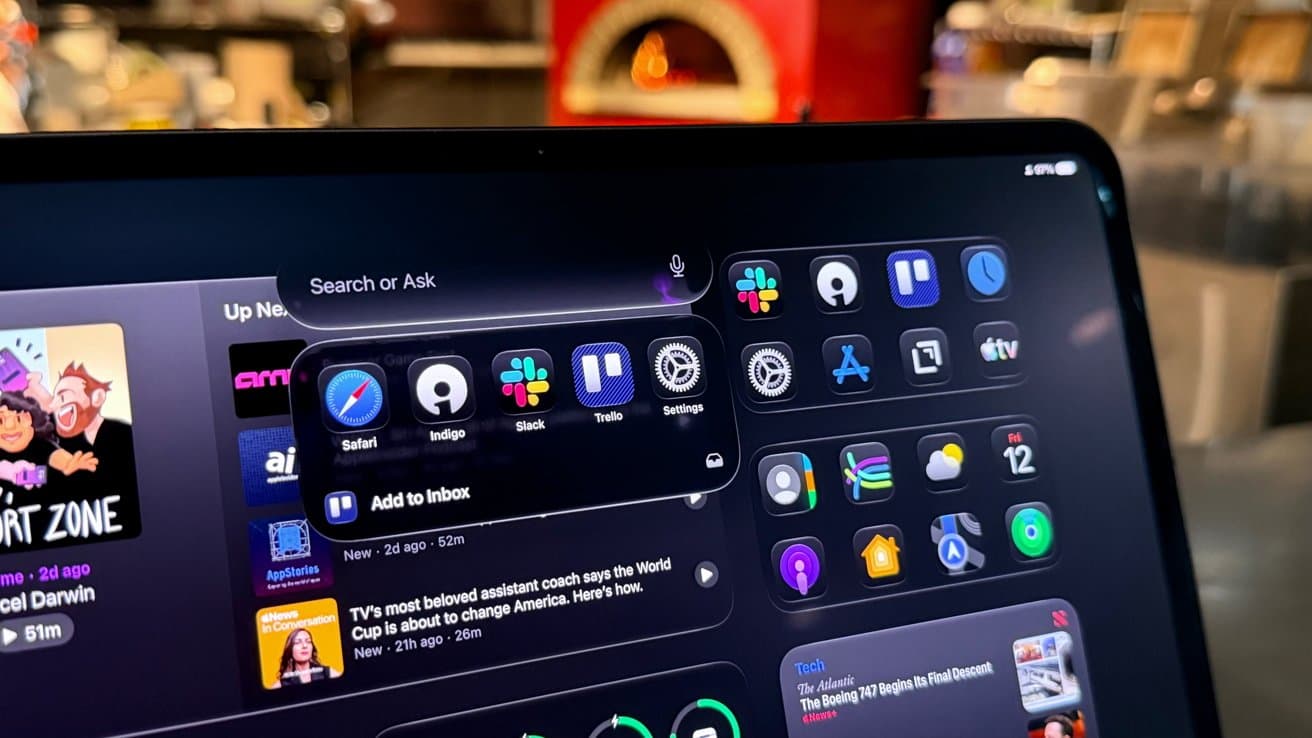
iPadOS 27 Beta Review: Your iPad, Now With Siri AI
Apple's iPad operating system has long followed a predictable rhythm — one year brings sweeping, headline-grabbing changes, and the next delivers quieter refinements. iPadOS 27 firmly lands in the latter camp. With a clear focus on Siri AI integration and meaningful system optimizations, this release may not dazzle casual users on first glance, but for power users and iPad-first workflows, the improvements are worth paying close attention to. Here's a comprehensive look at what the iPadOS 27 beta brings to the table.
The Tick-Tock Upgrade Cycle Continues
If you've followed Apple's iPad software releases over the past several years, you'll recognize the pattern. iPadOS tends to alternate between landmark updates — the kind that redefine what the device can do — and incremental updates that consolidate and polish. iPadOS 26 was widely regarded as one of the most significant releases in years, fixing long-standing complaints about the platform's multitasking, file management, and general power-user capabilities. iPadOS 27, by contrast, takes a step back from sweeping UI overhauls and instead zeros in on two key pillars: Siri AI and system-level performance.
That's not necessarily a criticism. Every major operating system needs breathing room between big leaps, and Apple is clearly using the iPadOS 27 cycle to embed its evolving AI capabilities more deeply into the iPad experience rather than rushing another round of feature additions.
Siri AI: The Star of iPadOS 27
The single biggest story in iPadOS 27 is the integration of enhanced Siri AI features throughout the operating system. Apple has been steadily rebuilding Siri from the ground up in recent years, shifting it from a voice assistant with limited contextual understanding to a genuinely intelligent system capable of handling complex, multi-step tasks across apps.
In iPadOS 27, that evolution becomes more visible in day-to-day use. Siri is now more deeply integrated with system search and Spotlight, allowing users to surface information, launch workflows, and query on-device data with a level of nuance that previous versions couldn't match. Whether you're searching for a specific photo taken at a restaurant last month or asking Siri to draft a response based on the contents of an email thread, the AI-powered capabilities feel meaningfully more capable than before.
Power users will notice the difference most acutely. Those who rely on iPad for professional workflows — document editing, creative work, research, or communication — will find that Siri can now act as a more reliable co-pilot rather than an occasional shortcut tool. The assistant has become better at understanding intent, maintaining context across requests, and integrating results from multiple apps simultaneously.
System Optimizations That Matter
Beyond Siri, iPadOS 27 delivers a suite of system-level optimizations that contribute to a smoother, more responsive experience. These aren't the kinds of changes that make for exciting press release bullet points, but they're precisely the improvements that users feel after a few days of real use.
App launch times, multitasking transitions, and general UI responsiveness all feel tighter in the beta builds. Apple has clearly done work under the hood to better utilize the performance cores of Apple Silicon chips found in modern iPad Pro and iPad Air models. For users running demanding apps — video editing tools, large spreadsheets, design applications — the efficiency improvements translate to fewer dropped frames and more fluid interactions.
Battery optimization has also received attention. Background app activity is better managed, and the system appears to make smarter decisions about when to defer non-urgent tasks to preserve battery life during active use sessions.
New and Useful Upgrades Worth Noting
While the headline features center on Siri AI, iPadOS 27 does include a handful of other additions that improve the platform in practical ways. Here are some of the notable upgrades included in the beta:
- Enhanced Spotlight Search: Spotlight now surfaces richer results with AI-assisted context, making it easier to find files, contacts, and app content without opening individual apps first.
- Refined Multitasking Gestures: Apple has tweaked several multitasking interactions to feel more intuitive, reducing the learning curve for new users while preserving the depth that power users depend on.
- Improved Handoff and Continuity: Transitions between iPad, iPhone, and Mac feel more seamless in iPadOS 27, with faster handoff times and better state preservation when switching devices mid-task.
- Accessibility Improvements: As with every major iOS and iPadOS release, Apple has included meaningful accessibility enhancements, including updates to voice control responsiveness and display accommodation settings.
- App Library and Home Screen Updates: Minor but welcome refinements to how apps are organized and displayed give the home screen experience a slightly fresher feel without a complete redesign.
Who Will Feel the Most Impact?
The honest answer is that iPadOS 27 is designed most visibly for power users — the segment of iPad owners who push the device toward its limits each day. If you use your iPad as a primary computer, work across multiple apps simultaneously, or depend on Siri to streamline your productivity, this update will feel like a meaningful step forward.
Casual users who primarily browse the web, watch videos, or use a handful of apps will experience improvements mostly as subtle background polish: things feel a little faster, a little smoother, and Siri occasionally impresses when invoked. That's not nothing, but it's unlikely to feel transformative.
Should You Install the iPadOS 27 Beta?
If you're a developer or an enthusiast comfortable navigating occasional instability, the iPadOS 27 beta is worth installing to explore the Siri AI improvements firsthand. The early builds are reasonably stable for a beta, though as with any pre-release software, it's best to avoid installing it on a device you depend on for critical work.
For everyone else, waiting for the public release makes sense. The improvements in iPadOS 27 are real and worth having, but none of them are urgent enough to justify the risks that come with running beta software on a primary device.
The Bottom Line on iPadOS 27
iPadOS 27 is a focused, confident update that knows exactly what it wants to be. By centering the release around Siri AI integration and system optimizations, Apple acknowledges both where the platform is heading and what it needs right now. It won't generate the same excitement as a landmark release, but it lays important groundwork for the more ambitious changes that will inevitably follow. For iPad-first users and power users especially, iPadOS 27 is a quiet but meaningful upgrade that makes an already capable device feel a little smarter and a little faster — and sometimes, that's exactly what's needed.